
Your direct ordering channel
Your menu. A direct route to dinner.
A restaurant-branded ordering website gives customers a clear place to choose their meal, select pickup or delivery and order from you again.
See it with your restaurant in mindService methods, payments and website options are configured for your restaurant.
A journey customers can follow.
Show the real order journey during setup, including the account step and the service choices available at your location.
- 01
Explore your menu
Customers browse categories, products and available options. You maintain the prices, images and product information.
- 02
Choose how to receive it
Customers choose from the pickup or delivery options your restaurant offers, with the applicable service rules.
- 03
Confirm and follow the order
Checkout requires a verified email account in the current flow. Customers can then follow their order status.
Your restaurant. Their home screen.
There’s something special about seeing your restaurant’s own name on an app. Give regulars a branded place to browse your menu and order directly, alongside your ordering website. Branding, app setup and store publication are part of the launch conversation; we’ll walk through them in your demo.
Talk about your restaurant’s appMake the payment choices explicit.
Online payments use a configured restaurant-owned Stripe account and require account, location and checkout checks. Available payment methods depend on that setup. Cash or collection choices follow your restaurant’s settings; do not assume every method is enabled.
Understand payment setupThe order arrives where your team works.
After the customer places an order, your team reviews it and continues through preparation and fulfilment. Walk through that handoff before promoting the ordering link.
See order management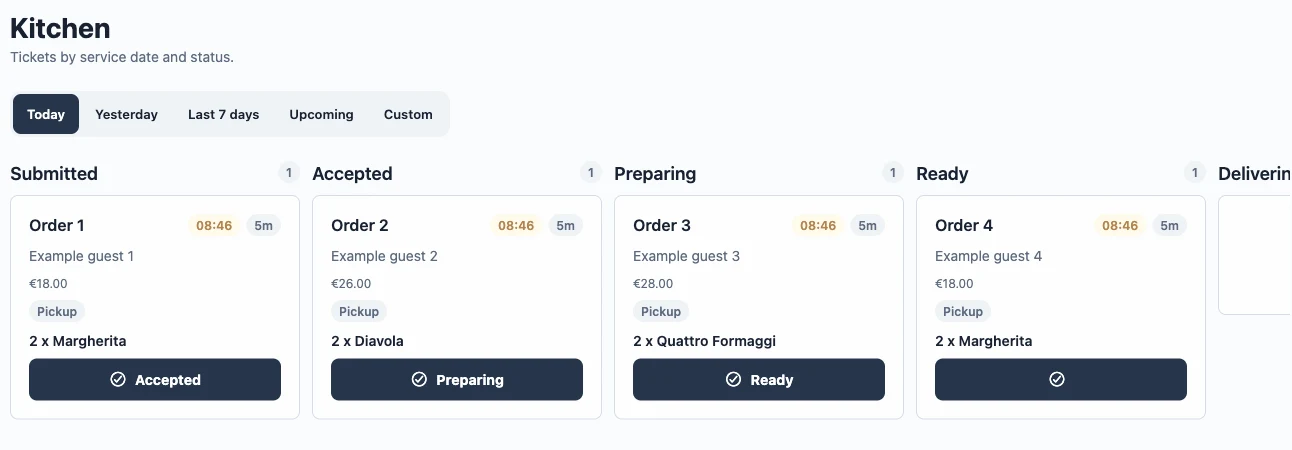
Start with the channel your customers will use.
Discuss a branded customer app if it fits your restaurant. App configuration and store release are separate steps; an ordering website does not mean a dedicated app is already published.
Plan your first direct-order journeyA few things you might be wondering.
Do customers need to download an app?
They can order through the restaurant’s web channel. A dedicated customer app is an additional setup and release option.
Can someone order without an account?
The current checkout requires a verified email account. We show that step in the demo so you can assess the complete customer journey.
Will marketplace orders appear here too?
There is no verified native Just Eat, Deliveroo or Uber Eats order integration. Those channels can continue separately.